Click-to-WhatsApp Ads in 2026: 7 Steps to Your First Campaign
SendSeven Team, Editorial Team
Build a Click-to-WhatsApp Ads campaign step by step: connect the WhatsApp Business API, configure Meta Ads Manager, sharpen targeting, set up the welcome template, wire up the Conversions API. Live in 60 minutes.
TL;DR
A first Click-to-WhatsApp Ads campaign is live in under 60 minutes if the WhatsApp Business API is already active. Seven steps: verify the account → link in Meta Business Manager → campaign objective with conversion location WhatsApp → audience → creative + pre-filled message → welcome template → tracking via pixel + Conversions API. The most common setup mistakes cost two weeks — this guide shows how to avoid them.
This setup guide is the deep-dive companion to the complete CTWA & wa.me guide. The pillar lays out the strategic frame; this article hands you the wrench.
Prerequisites
Three things need to be in place before you even start step 1:
- An active WhatsApp Business API. The WhatsApp Business app is not enough. If you have not set this up yet, start with our setup guide — plan one to two days for verification.
- A Meta Business Manager account. With admin rights on the Facebook page that will run the CTWA ads.
- An active ad account in Meta Business Manager. With a payment method on file and at least one approved pixel.
If those three things are in place, the actual setup path — from linking assets to your first delivered ad — takes 45 to 60 minutes.
Step 1: Verify the WhatsApp Business API
In Meta Business Manager under Business settings → Accounts → WhatsApp accounts, the WhatsApp Business API needs to show up as a verified asset. If you see your phone number with a status of "Connected" or "Verified", step 1 is done.
Common gotcha: the API is connected through a platform vendor like SendSeven, but it is not visible in Meta Business Manager. That happens when the WhatsApp Business API verification ran under a different business ID. Fix: contact SendSeven support — the asset link is checked and re-established on the Meta side inside Business Manager.
Step 2: Link the account in Meta Business Manager
In Meta Business Manager open Ad accounts → Settings → Ad assets. Link:
- The WhatsApp Business phone number (from step 1)
- The Facebook page the ad will run from
- The ad account with a payment method on file
Important: the page must also be registered as an asset inside Meta Business Manager. If it only lives in your personal Facebook account, it will not show up in the ad account. Fix: add the page as a business asset under Business settings → Accounts → Pages → Add page.
Step 3: Campaign objective and conversion location
In Ads Manager click Create → New campaign. Pick Engagement or Leads as the objective. Both support the "WhatsApp" conversion location.
Recommendation:
- Engagement + conversion location WhatsApp — fits service-driven campaigns, local contractors, pharmacies, consultation-driven models.
- Leads + conversion location WhatsApp — fits B2B demos, insurance, high-ticket consumer goods with a longer sales cycle.
Note on the ODAX migration: the old "Messages" objective has not existed as a top-level pick since the 2024 reorganization. If you are following an older tutorial, you will look for it in vain.
Step 4: Define the audience
Three targeting strategies that work reliably:
- Lookalike on existing contacts. If you already have WhatsApp contacts with high engagement, upload that list (hashed) into the custom-audience tool and build a 1% lookalike. The algorithm finds profiles that look statistically similar — often the most efficient source.
- Interest + location. Classic targeting for local services. Example contractor: 30 km around Boston, interests "home improvement" and "landscaping", age 30–65, language English.
- Retargeting on website visitors. If you tag with the pixel, you can pull back visitors who did not convert on the website. CTWA as a re-entry point works noticeably better here than a classic sales reminder.
Minimum audience size for good algorithmic optimization: roughly 100,000 people. With very local targeting, expect a trade-off between precision and learning speed.
Step 5: Creative and pre-filled message
The creative is what shows up in the feed (image, video, copy, CTA button). Patterns that work for CTWA:
- Photo > video. Static images with a clear product or service tie often outperform polished videos for local providers — they load faster and the CTA is visible immediately.
- Hook in the first line. Maximum 7 words before the "see more" cut-off kicks in. Example: "Need a paving job? Quote in 24 hours."
- CTA button: "Send Message", "Contact Us on WhatsApp", or "Learn More". Meta surfaces the button automatically based on the conversion location.
The pre-filled message appears as an input suggestion in the user's WhatsApp chat. It is optional but effective: well-formed messages lift reply rates by 30–50%, because the user does not need to compose anything.
Recommendation: short, context-specific, in the user's voice. Example: "Hi, I saw your ad — I'm interested in ...". The user can overwrite it any time.
Step 6: Set up the welcome template
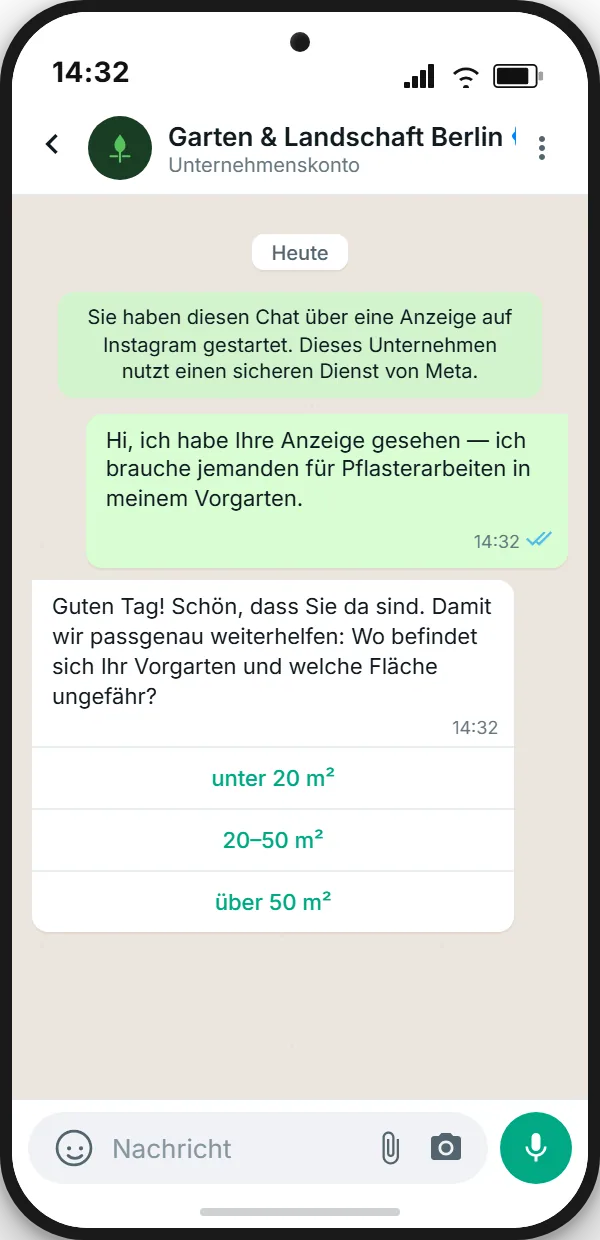
Anyone who taps the CTA sees your business's first reply within seconds. This is mission-critical — a significant share of clickers bounce if the first reply takes more than 60 seconds.
A good welcome template does three things at once:
- Confirms the message was received.
- Qualifies with a first question, ideally with quick-reply buttons.
- Sounds human: no boilerplate bot tone — concrete, helpful phrasing.
The welcome message itself can be sent from your platform, for example the SendSeven unified inbox, without Meta approval, as long as it goes out as a free-text reply inside the 24-hour customer service window that the user's message opens. If you reply within those 24 hours, your reply starts the 72-hour Free Entry Point, during which Meta charges nothing for any message type, templates included. Only Meta's fee is waived; SendSeven still bills these messages through your plan. Once the 24-hour window has closed, you can only send approved templates, and Meta charges nothing for them until the 72 hours run out.
Step 7: Tracking via pixel and Conversions API
Without clean tracking, Meta optimizes only on clicks — not on qualified conversations. The result: lots of cheap, low-quality leads. The fix is the combination of pixel and Meta Conversions API.
At minimum, instrument three events:
Lead— once the first bot qualification or first human reply lands cleanly.Schedule— when an appointment is booked through WhatsApp.Purchase— on a completed purchase, with revenue value (value+currency: EUR).
SendSeven does not send these events to Meta. The Conversions API is Meta's own interface, which you set up separately with your developers or a tracking tool. In the inbox, SendSeven shows you which ad started each chat that came from an ad. An Analytics panel for conversations from ads counts chats per ad, split between Facebook and Instagram, with no revenue or ROI figures. On the Professional plan and up, the Came from an ad trigger can also start a dedicated flow for these chats. How to connect the Conversions API yourself is covered in the dedicated CAPI & tracking spoke.
Common setup mistakes
- Page not in Business Manager. Personal Facebook pages do not show up in the ad account. Register them as an asset first.
- Wrong campaign objective. Picking the old "Traffic" objective sends users to a landing page — not to WhatsApp.
- No welcome template. Silence after the click = noticeable drop-off.
- No CAPI. Pixel-only loses 20–40% of tracking accuracy after Apple's privacy updates.
- Audience too narrow. Below 50,000 people the algorithm learns too slowly.
- Missing pre-click notice. A GDPR / UK GDPR risk — details in the GDPR spoke.
- No 24/7 reply plan. Ads run at night — without a bot or weekend coverage you waste paid clicks.
Build your CTWA funnel with SendSeven
Bot, unified inbox, handover and per-ad reporting in one platform. EU-hosted, made in Germany.
FAQ
How long does CTWA setup actually take?
If the WhatsApp Business API is already running and the page plus ad account are registered in Meta Business Manager, pure setup takes 45 to 60 minutes. If any of those prerequisites are missing, add one to two days for verification.
Which campaign objective is better for local service providers — Engagement or Leads?
Engagement, with conversion location WhatsApp. It is built for fast, low-friction conversations and fits service-oriented businesses. Leads is optimized for longer sales cycles and form-driven funnels.
Do I need an approved template for the first reply?
No. The user's message from the ad opens the 24-hour customer service window, and inside it your first reply can be free text. If you reply within those 24 hours, Meta charges nothing for the reply, and it starts the 72-hour Free Entry Point, during which Meta charges nothing for any message type. After the 24-hour window closes, you can only send approved templates, and Meta charges nothing for them until the 72 hours run out.
What if the ad does not get delivered?
In 80% of cases it is an unapproved ad account, an unapproved creative, or a missing page link. Ads Manager surfaces a concrete reason under Ad status. For creative rejections: overly promotional language ("Best", "Guaranteed") or missing pre-click notices are common causes.
Can I run CTWA without a platform like SendSeven?
Yes, technically — directly through the WhatsApp Cloud API. In practice you then lack an inbox, a bot builder, team handover, and chat counts per ad. For teams of two or more or anything above 100 conversations a month, a platform is meaningfully more efficient.
How do I make sure clicks coming in at night do not get lost?
With a welcome template that responds immediately and qualifies the request, plus a clear expectation set by the bot ("Our team replies in person between 8 and 9 a.m."). That keeps the conversation warm without anyone having to type at 2 a.m.
Further reading: