WhatsApp Username: How to Set It Up and Reserve It in 2026
Kai Viertel, Co-Founder & CMO
WhatsApp is introducing usernames in 2026. Instead of handing out your phone number, you'll share a name you choose yourself. This guide shows how to reserve your WhatsApp username, which rules apply, what the optional username key adds, and when a realistic rollout in your country is likely.
TL;DR
WhatsApp is introducing usernames in 2026. Instead of handing out your phone number, you'll share a name you choose yourself. Reservation has been possible since 29 June 2026, under Settings, Account, Username. The launch rolls out in waves: from 7 July 2026 in the first countries, from 20 July in more, and for the rest of the world from September 2026. The optional username key adds extra protection: a new first-time contact then needs both your username and the key. Important: on private accounts the username replaces your visible number; on WhatsApp Business accounts the number stays visible.
What the WhatsApp username is
The WhatsApp username is a name you choose yourself that lets people reach you without knowing your phone number. Until now, your number was the key to every chat. Anyone who wanted to message you needed it in their address book. The username changes that: you simply share your name, for example in a forum, under a video or on a business card, and keep your number to yourself.
WhatsApp officially announced the feature at the end of June 2026. In its company blog, the post says it is time to reserve your own WhatsApp username. The idea behind it is clear: more control over which personal data you share with strangers.
One point up front, so no false expectations arise. There is no public directory and no search suggestions. Nobody can find you through your username by simply typing around. Anyone who wants to message you for the first time has to know your exact username. That is a deliberate security feature, not an oversight.
How to reserve your WhatsApp username, step by step
Reservation has been possible since 29 June 2026. It lets you secure your preferred name before the feature itself goes live in your country. That's worth doing, because popular names get taken quickly.
Here's how to reserve your username:
- Open WhatsApp and tap Settings.
- Choose the Account section.
- Tap Username.
- Enter your preferred name and check whether it's available.
- Confirm the reservation.
Here's what the flow looks like in the app:
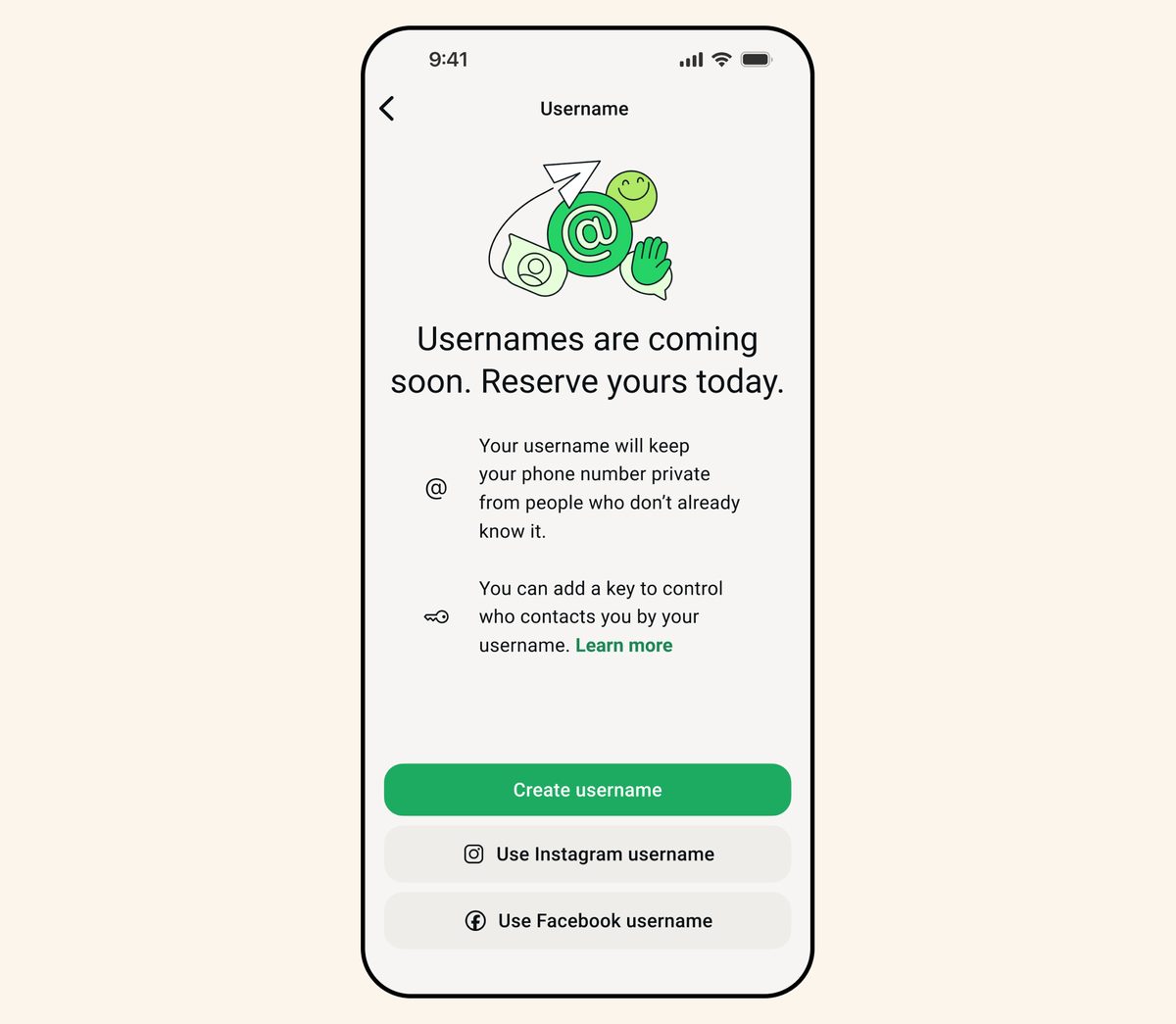
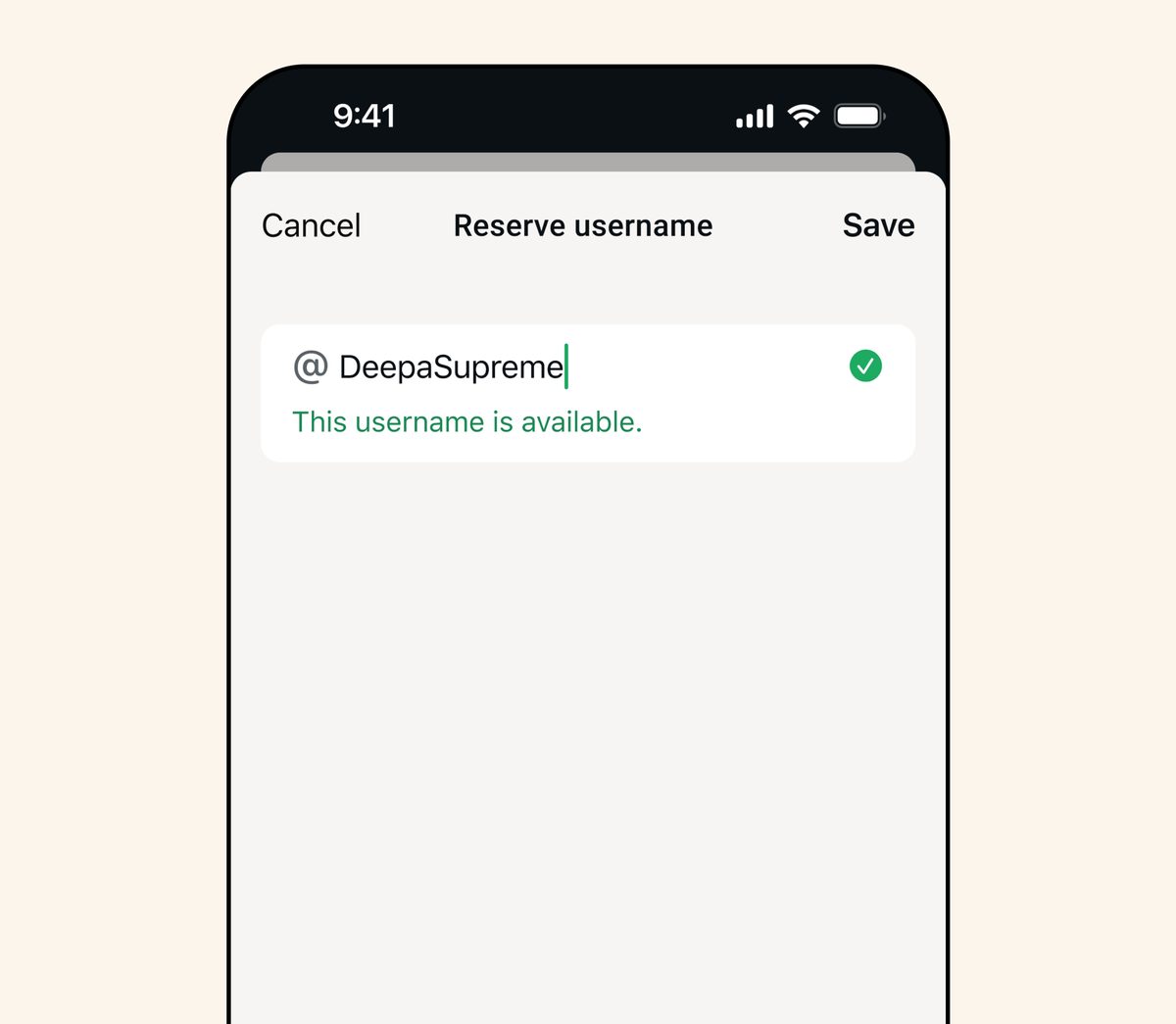
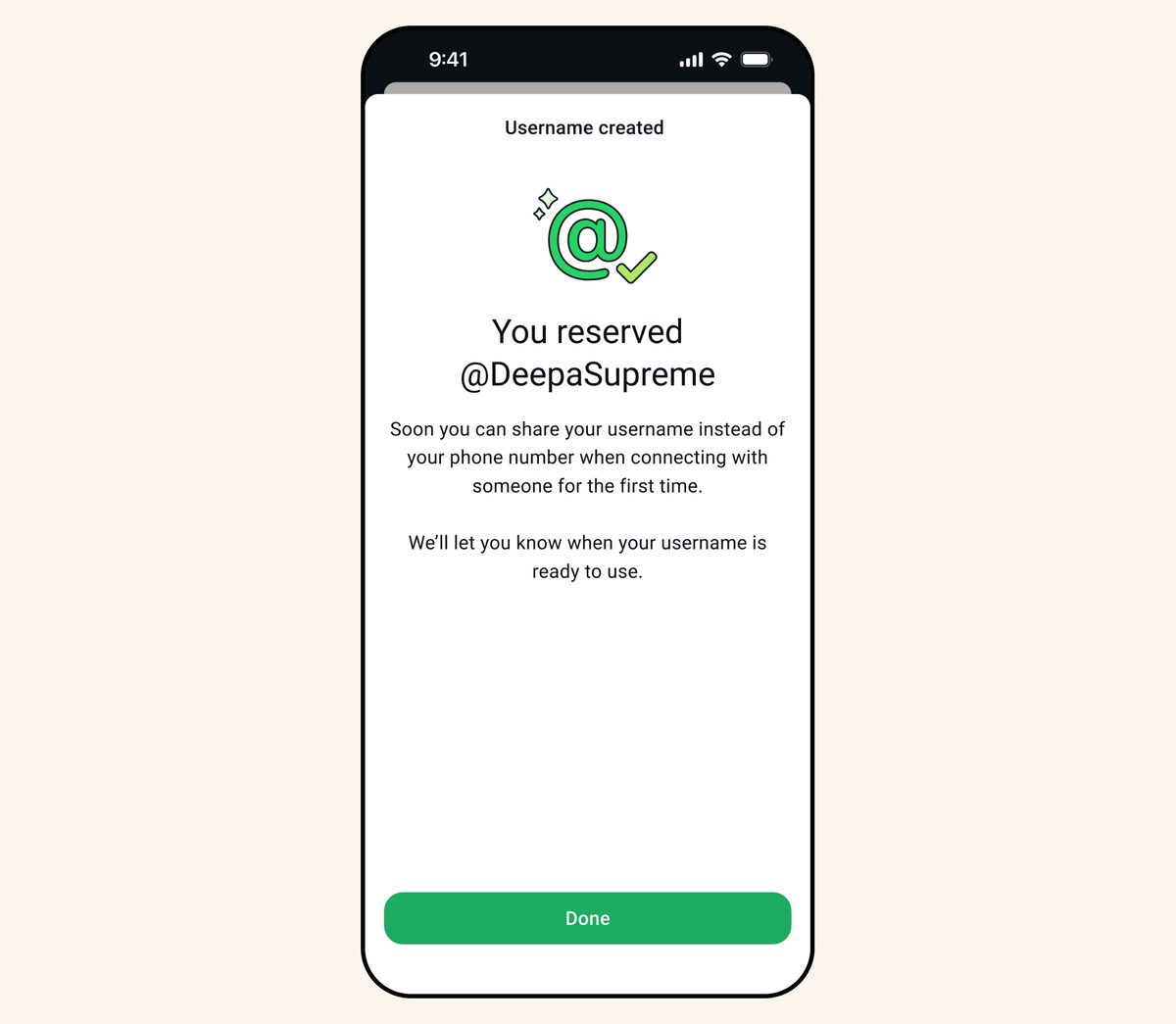
The rollout happens country by country over several weeks. Once the username is actively usable in your country, you'll get a notification directly in the app. Until then the name is reserved for you, but not yet live as a way to be reached. If you don't see the Username menu item yet, reservation simply hasn't rolled out in your region. In that case, all you can do is be patient and check the app store for an update.
Which rules apply to your username
WhatsApp sets a fixed format. Knowing the rules saves you the trial and error. Your username has to meet these requirements:
- Length: between 3 and 35 characters.
- Allowed characters: only lowercase letters, numbers, the period (.) and the underscore (_).
- At least one letter: a name made up of numbers only is not allowed.
- No domain look: the name must not start with www. and must not end in extensions like .com or .net.
That last rule stops a username from looking like a web address and being abused for deception. When choosing a name, remember it will later need to be spoken and typed. Short, unambiguous and free of easily confused character sequences is the best choice.
When the username becomes available in your country
The launch happens in several waves. You can already reserve worldwide, but WhatsApp is enabling active use as a way to be reached gradually. There's no fixed date yet for most countries. The realistic window is the broad rollout, that is, from September 2026, when the rest of the world's turn comes. The in-app notification remains the most reliable signal.
| Wave | Date | Countries |
|---|---|---|
| Reservation | from 29 June 2026 | available worldwide |
| Wave 1 | 7 July 2026 | Algeria, Azerbaijan, Ghana, Libya, Nepal |
| Wave 2 | 20 July 2026 | more countries |
| Broad rollout | from September 2026 | rest of the world |
The dates come from WhatsApp's official announcement. Shifts are common with a rollout this large, so treat the table as a guide, not a guarantee. The only reliable starting gun for your country is the notice in the app.
What the username key adds
The username key is an optional key you can set in addition to your username. When it's turned on, your name alone is no longer enough to message you for the first time. A new first-time contact then has to know both your username and the key.
The benefit is obvious. You can share your username fairly freely, for example publicly under a post, without just anyone being able to start a chat from it right away. Only someone who has also received the key from you can make first contact. For people with high visibility, or for anyone who fears unwanted messages, that's a noticeable gain.
The key is voluntary. If you want to be as reachable as possible, leave it off. If you value an extra hurdle, switch it on. Either setting can be changed at any time in the settings.
Private account or WhatsApp Business: the difference
This is the most important difference, and the one most often overlooked. The username behaves differently on a private account than on a business one.
On a private account, the username replaces your phone number to the outside world. New first-time contacts who reach you through the username no longer see your number, as long as the username is turned on. That's exactly the privacy gain: you share a name, not your number.
On a WhatsApp Business account, it's different. Here the phone number stays visible, because a business usually wants to be clearly identifiable and reachable on its official number. In a business context, the username is more of an additional, easy-to-remember way to get in touch than a replacement for the number. By the way, creators, small businesses and organizations can also claim their existing Instagram or Facebook username on WhatsApp.
If you run a business and want to set up the WhatsApp username for your customer communication, a different logic applies. You'll find the right walkthrough in the article Set up a WhatsApp Business username. As a B2B messaging platform, SendSeven brings WhatsApp and other channels together in one interface, but that's a different topic from the private username covered here.
What changes for your privacy
The username is first and foremost a data-protection feature. It decouples your identity on WhatsApp from the phone number you otherwise had to hand out everywhere. That reduces a whole range of everyday risks.
You no longer have to give out your number to be reachable, for example when selling through classifieds, in a community, or in a fleeting contact. The number stays private, the username is interchangeable. Combined with the username key, a second layer of protection against unwanted first-time contacts appears.
Two things are worth remembering. First, the number protection applies on a private account and for new first-time contacts, not retroactively for everyone who already knows your number. Second, on a business account the number stays visible. So before turning it on, check which account type you use and what you're trying to achieve with it. Anyone who genuinely wants to hide their number needs a private account with the username turned on.
Frequently asked questions
How do I reserve my WhatsApp username?
Open WhatsApp, go to Settings, then Account and finally Username. There you enter your preferred name, check availability and confirm the reservation. This has been possible worldwide since 29 June 2026.
When can I use the WhatsApp username in my country?
You can reserve right away. WhatsApp is enabling active use as a way to be reached in waves: from 7 July 2026 in the first countries, from 20 July in more, and for the rest of the world from September 2026. There's no fixed date for most countries yet, so the realistic window is the broad rollout from September. You'll get a notification in the app as soon as it's ready.
Which rules apply to the WhatsApp username?
The username is 3 to 35 characters long and may contain only lowercase letters, numbers, the period and the underscore. It must include at least one letter, must not start with www. and must not end in domain extensions like .com or .net.
What is the username key?
The username key is an optional extra key. When it's turned on, a new first-time contact has to know both your username and the key to message you for the first time. That way you can share your name more freely without just anyone being able to start a chat.
Is my phone number hidden by the username?
On a private account, yes: new first-time contacts who use your active username no longer see your number. On a WhatsApp Business account the number stays visible, because businesses are meant to be clearly reachable.
Can anyone find me through the username?
No. There is no public directory and no search suggestions. Anyone who wants to message you for the first time has to know your exact username, plus the key if it's turned on.
What is the difference between a private and a business username?
On a private account the username replaces the visible phone number. On a business account the number stays visible, and the username serves as an additional, easy-to-remember way to get in touch. Creators and small businesses can also claim their existing Instagram or Facebook username on WhatsApp.
Do I have to set a username?
No. The username is optional. You can still be reachable only through your phone number. But if you want to protect your number, you should reserve a preferred name early, because popular names get taken quickly.