WhatsApp Business Web & Desktop: Where the Free Option Hits Its Limits (2026)
SendSeven Team, Editorial Team
WhatsApp Web and the Desktop apps are handy, until the team grows. A max of four linked devices, no shared inbox, no handover. When the free option is enough, where it breaks, and how Coexistence bridges both worlds.
The essentials in 30 seconds
WhatsApp Web and the Desktop apps for Windows and Mac are mirrors of the smartphone. They run as Companion Devices: maximum four devices at once, all tied to a single main device. Convenient for one person, problematic from the second employee onwards. No handover, no shared inbox, no visibility on who answered what. From roughly 30 requests per day or two employees, the setup becomes more expensive than a proper team inbox. The fix: Coexistence. Keep using Web and Desktop, add a team inbox in parallel, from €49 per month.
What WhatsApp Web and Desktop actually are
Neither is a standalone version. Both are Companion Devices. They connect via QR code to the smartphone that runs the WhatsApp Business App or the personal app. The main device stays the anchor. Sync happens through the Meta cloud, end-to-end encryption stays intact.
Three variants exist: WhatsApp Web in the browser (web.whatsapp.com), the Desktop app for Windows from the Microsoft Store, and the Desktop app for Mac from the App Store. Functionally they are nearly identical. Differences show up in background notifications, file attachment size, and native keyboard shortcuts. Content-wise: same messages, same chat history, same limits.
When it works
For many small businesses, the Web and Desktop option is a sensible starting point. It is free, familiar, and needs no setup beyond scanning a QR code.
It genuinely works in three cases. One person running WhatsApp at the desk and on the phone when out. Very low volume: up to around 20 requests a day, all manageable at a glance. Or a clean split of duties with no overlap: one person reads, one person writes, no backup needed.
The moment someone replies in parallel or a conversation has to be handed off, the system starts to grind.
Companion Devices: the 4-device rule
The smartphone account allows a maximum of four Companion Devices at once. That means four browser sessions, Desktop installations, or tablets combined. Each device is linked individually and can stay offline for up to 14 days before the session expires.
Crucial point: four devices is not four employees. If the owner uses two devices personally (Mac at the office, tablet at home), only two slots remain for the team. With the fifth member, the musical-chairs logic kicks in: somebody has to log out so the next person can log in. Sharing login credentials between staff also breaches Meta's terms of service.
Seven limits that hit small businesses
The following points get painful fast once more than one person reads or writes:
- No shared inbox. Every device shows the same chat history, but there is no view on which request is assigned to whom, which one has already been handled, which is still open.
- No handover. When the office staff can't answer a question, there is no tool to pass it on to a colleague in sales. Except for "give them a call" or "write it down on a sticky note".
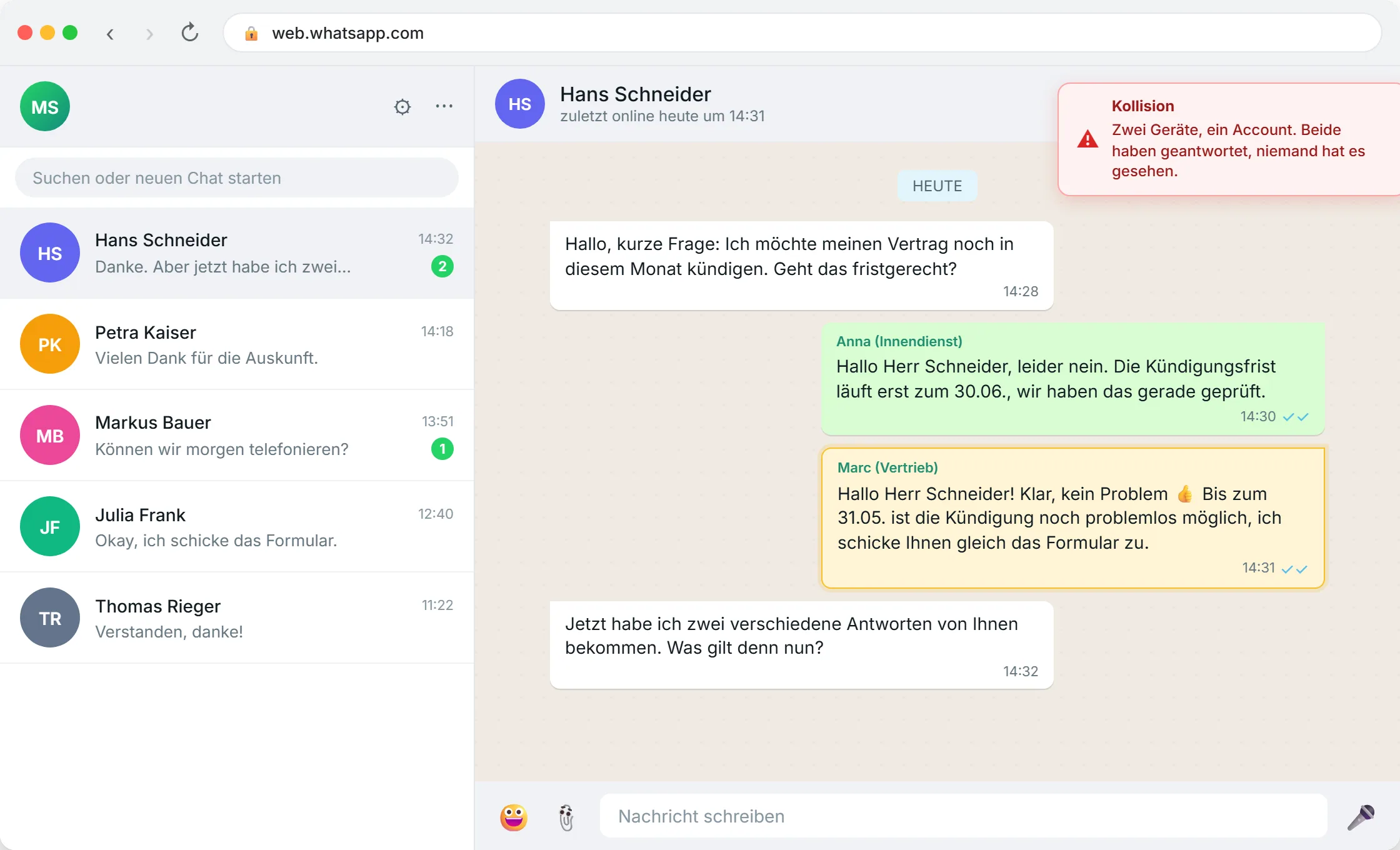
- No reply lock. Two employees can answer the same message at the same time. The customer gets two replies, often contradicting each other.
- No notes on the chat. Internal remarks ("careful, difficult customer", "last complaint still open") don't exist. The chat history is the only memory.
- No shared template library. Quick replies live on each device, not centrally. Everybody maintains their own collection.
- No statistics. Response times, volume, topic breakdown: all invisible. No numbers means no steering.
- Data protection is shaky. There is no data processing agreement with Meta for the Business App. For serious B2B communication with personal data, that is an open flank.
When the setup breaks
Three warning signs from advisory practice. If two of them apply, it's time for the next step:
- Requests get forgotten. A customer writes on Friday, nobody sees the message, she comes back annoyed on Tuesday.
- Double replies. The owner answers from the car, the assistant simultaneously from the office. The customer is confused.
- No overview of open threads. Who spoke to Mr. Schneider last? Nobody knows. It's in the chat history, somewhere.
A three-person insurance broker in Manchester recently told us: all three staff on WhatsApp Web. On a client's renewal deadline, two of them gave different information. Result: a lost long-standing customer, an internal blame meeting, two days of clean-up. Nobody could quantify the damage, but "that wasn't a £49-a-month problem".
The three ways out of the Web option
Anyone outgrowing WhatsApp Web and Desktop has three options. A short overview. Full depth lives in our comparison of App vs API vs Coexistence (German for now, English version in the works).
- Stay on Web and Desktop: sensible for solo owners or clean role splits without overlap. Costs nothing, doesn't scale beyond two active hands.
- Full move to the Business API: every team member in the team inbox, the owner stops typing from the app. Maximum functionality, but a hard break with the old way of working.
- Coexistence: Web and Desktop stay active, a team inbox runs in parallel. Same number, both worlds. Meta launched the mode in February 2025; in the EU, EEA and UK it has been available since October 2025.
Coexistence: keep Web and Desktop, add a team inbox
For most small businesses, Coexistence is the most elegant default. The owner stays in their WhatsApp Business App and in the browser, everything as before. In parallel, the team works from a professional team inbox: requests assigned, handovers visible, internal notes on the chat, response times measurable. Both sides see the same chat history in real time. One number, both worlds.
The switch is reversible: Coexistence can be turned off in the app settings at any time without losing data. Setup takes 10 to 15 minutes via Embedded Signup, with no number-porting drama.
What stays unchanged: WhatsApp Web and Desktop keep running, the owner keeps typing from the app, the status, catalogue, and group chats work as ever. What gets added: shared inbox, template library, AI replies for routine questions, statistics, campaigns, and a Data Processing Agreement (DPA) with the platform provider.
Full guide for the mode: Coexistence Guide 2026.
Worked example: where the numbers tip
"Free" applies to the software, not the effort. Once you put an hourly rate behind it, the difference shows up.
Web and Desktop alone (3 employees)
- Coordination overhead: ~75 min per day per employee (clarifying double replies, verbal handovers, searching chat history)
- 3 employees × 75 min × 21 working days
- = ~79 hours per month of extra effort
- At a calculated €20 per hour: ~€1,575 per month in hidden cost
- Platform cost: €0
- Total: ~€1,575 per month
SendSeven Coexistence from €49
- Platform fee: €49 per month (Basic plan)
- Meta messages (typical small-business volume): ~€50 per month
- Coordination overhead: heavily reduced through assignment, handover, templates
- Realistic remaining overhead: ~15 min per day per person
- = ~16 hours per month instead of 79
- Total: ~€99 per month + ~€320 of calculated residual effort
Note: hourly rates and effort estimates are illustrative. Actual values vary by volume, topics, and team structure. Conservatively: from two active employees onwards, the cost threshold sits well below the status quo.
FAQ
How many devices can I link to WhatsApp Web and Desktop?
A maximum of four Companion Devices at once: browser, Desktop apps, and tablets combined. The smartphone doesn't count towards the limit. Inactive devices are automatically logged out after 14 days.
Can several employees work on WhatsApp Web at the same time?
Technically yes, as long as each has their own linked device. Practically no: there is no shared inbox, no assignment, no handover. Everyone sees everything, nobody knows who is answering what.
What happens to my chat history when I switch to Coexistence?
On activation, up to six months of chat history are synced to the platform, provided history sync is accepted. WhatsApp Web and Desktop keep running in parallel, new messages appear in both worlds at the same time.
Does the WhatsApp Business App work without a smartphone?
No. WhatsApp Web and the Desktop apps are Companion Devices: they need an active smartphone account in the background. If the main device is offline for 14 days, all linked devices are logged out automatically.
Is WhatsApp Web GDPR-compliant for B2B communication?
WhatsApp Web and Desktop run on the WhatsApp Business App. There is no Data Processing Agreement with Meta for the app. For commercial processing of personal data, for instance at an insurance broker or a medical practice, a DPA is effectively mandatory. It only exists via the Business API or via Coexistence with a platform provider.
Can I send campaigns or newsletters from WhatsApp Web?
Broadcast lists in the Business App are capped at 256 recipients and count as a single broadcast per send. Once your list or send frequency grows, this gets tedious and risky. Real campaigns with thousands of recipients go through Business API templates.
What does switching to Coexistence cost?
SendSeven platform fee from €49 per month (Basic plan, all 8 channels included). Meta bills its message prices to you directly, separate from your SendSeven invoice. SendSeven's own price is the fixed base fee with an included message allowance, plus above it a fixed price per message, not a percentage of Meta's rate. Service replies inside the 24-hour window were free without limit until 30 September 2026. Since 1 October 2026 the first 1,000 per number and month are free, then Meta charges the utility rate (€0.0182 in the UK). Marketing templates in the UK currently cost around €0.05 per message (see Meta's rate card for exact GBP). Incoming messages are free on every plan. 14-day free trial, no credit card.
What happens if I want to stop using Coexistence?
Coexistence can be turned off in the app settings at any time. The number then runs exclusively through the WhatsApp Business App again, the local chat history stays intact. Reversible, no data loss.
Conclusion: Web and Desktop are fine for one person, not for a team
WhatsApp Web and the Desktop apps are not a bad solution. They are a single-seat solution. Anyone using them as a team tool pays in lost requests, double replies, and a missing DPA. Coexistence keeps the best of the familiar world: Web and Desktop keep running, the owner keeps typing from the app. On top comes what was missing: a team inbox, handover, notes, statistics. From €49 per month. Automated where it helps. Personal where it counts.
14-day free trial
Keep Web and Desktop, add a team inbox. One number, both worlds. From €49 per month. No credit card.
Start 14-day free trial →