WhatsApp Coexistence: Run the Business App and API in Parallel (2026 Guide)
SendSeven Team, Editorial Team
WhatsApp Coexistence lets businesses run the Business App and the WhatsApp Business API on the same phone number — at the same time. How it works, how to set it up, what it costs, what it does and doesn't do, and when to choose it over a full API migration.
The short version
WhatsApp Coexistence is a Meta-supported mode. It lets you run the WhatsApp Business App on a phone and the WhatsApp Business API on a professional platform like SendSeven in parallel on a single phone number. Both sides see the same chat history. Both can reply.
Who it's for: small and mid-sized businesses that don't want to give up the Business App, but also need a team inbox, AI replies, or marketing campaigns. Soft transition, no number migration, reversible at any time, and messages sent from the app stay free.
What is WhatsApp Coexistence?
Before Coexistence, businesses using WhatsApp professionally had to pick one path. Either the free Business App on the owner's phone (capped at 5 linked devices, no API, no automation). Or a switch to the WhatsApp Business API via a specialized provider — which until then meant giving up the Business App entirely.
With the Coexistence mode, Meta has ended the either/or. The same phone number can now be active in the Business App on a smartphone and in an API platform like SendSeven at the same time. Both sides share the same chat history in real time. Both can reply to the customer.
Rollout timeline
| Date | Milestone |
|---|---|
| February 2025 | Meta launches Coexistence. Not yet included: the EU, EEA and UK, plus Australia, India, Japan, Nigeria, the Philippines, Russia, South Africa, South Korea and Turkey |
| May 2025 | India added |
| October 2025 | EU, EEA and UK added, together with Australia, Japan, the Philippines, Russia, South Korea and Turkey |
| April 2026 | Nigeria and South Africa added |
How does Coexistence work technically?
Coexistence isn't a separate product. It's an onboarding mode selected during WhatsApp Business API setup via Meta's official Embedded Signup. Instead of the previous "Migrate Number" option, you choose the option that says the number is already being used in the Business App.
Echo messages: the heart of the sync
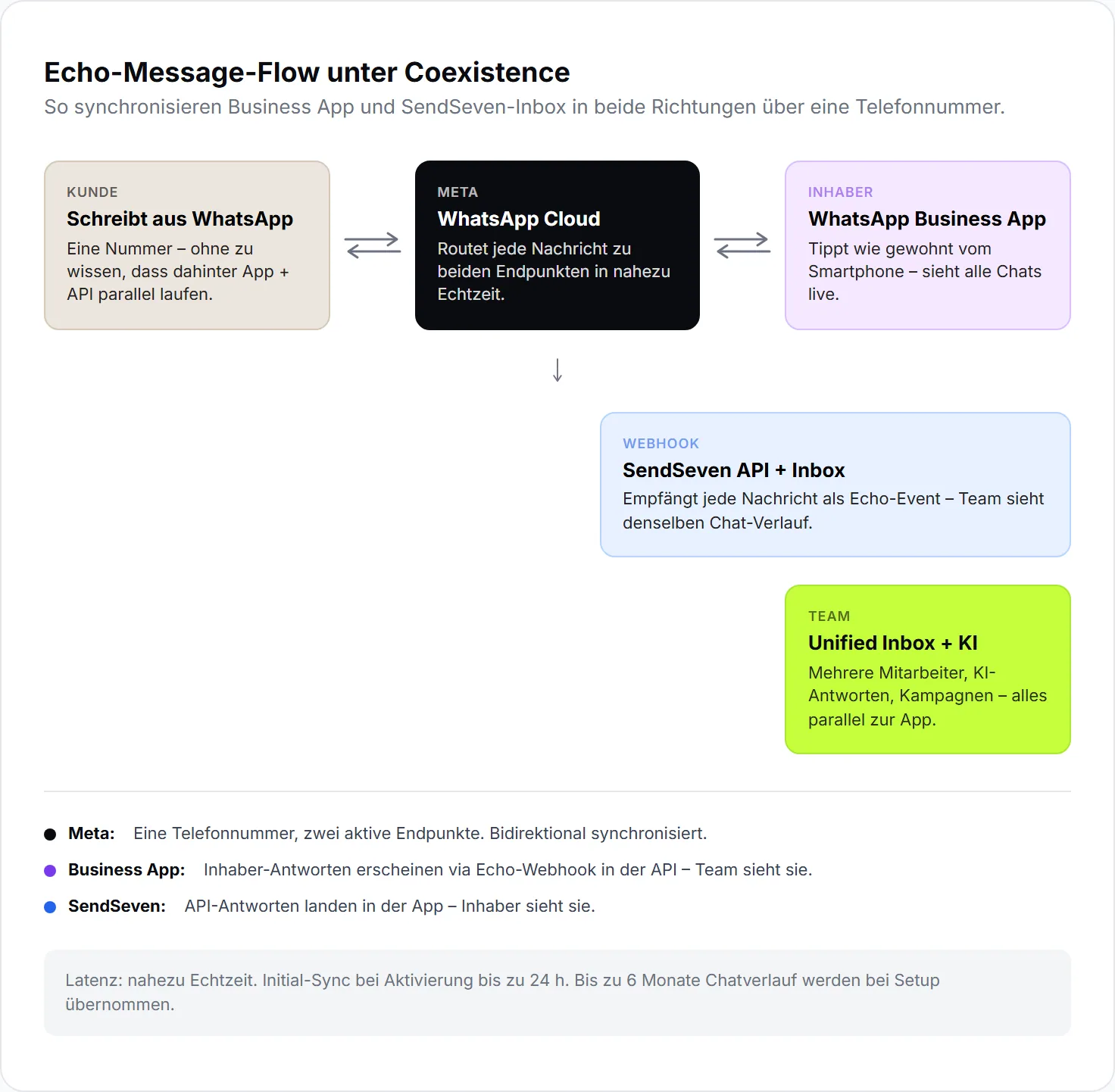
Once Coexistence is active, sync runs in both directions through so-called echo messages. When the owner replies from the Business App, Meta sends that message as a webhook event to the API platform. The platform stores it in the inbox as if a team member had sent it. In the other direction, messages sent through the API show up directly inside the Business App.
Sync runs in near real time in most cases. After longer periods of app inactivity, or during initial activation, full sync can take up to 24 hours.
What gets synced
- Up to 6 months of chat history on initial activation (1:1 chats only, no groups)
- All contacts from the WhatsApp address book
- New messages in real time (App ↔ API, bidirectional)
- Media (images, video, voice notes, documents)
What does not get synced
- Group chats (stay in the app, not visible in the API platform)
- WhatsApp Status, Stories, Catalog (app-only features)
- WhatsApp Web/Desktop sessions on the owner's side keep working through the Business App (the standard 4-device limit still applies)
Activating Coexistence: step by step
Activation happens as part of the WhatsApp Business API setup in SendSeven. If you haven't finished WhatsApp setup yet, start there. If you're already onboarded on the API, you can pick Coexistence as a mode in the Embedded Signup flow. The full step-by-step Coexistence setup guide lives in our developer docs.
Check the prerequisites
- WhatsApp Business App on the phone, on the latest version
- A phone with a working camera (for the QR code scan)
- Verified Meta Business Portfolio (legal name, address, website, phone number)
- An existing WhatsApp Business number (Coexistence only works with App numbers, not personal WhatsApp numbers)
The 5 steps in Embedded Signup
- Pick the mode. In the SendSeven onboarding flow you launch Meta's Embedded Signup. On the first screen, select the option that says the phone number is already in use with the WhatsApp Business App.
- Enter and verify the number. Type in the App number and confirm the verification code by SMS or call.
- Scan the QR code. A new message containing a QR code shows up inside the Business App. Tap the message and scan the QR code displayed in the signup flow.
- Confirm history sync (optional). Decide whether to pull up to 6 months of existing chat history and contacts into the API platform. Recommendation: yes — otherwise the inbox starts without context.
- Done. Meta shows the account overview. The number is now active in parallel inside the app and inside SendSeven. Full sync of historical messages can take up to 24 hours depending on data volume.
Active setup time: about 5 to 10 minutes. Background sync time: up to 24 hours for full history.
What stays, what goes — the honest limits list
Coexistence isn't a free "best of both worlds." Meta disables a small number of app features on activation so the parallel setup works cleanly. An honest list of what changes:
In the Business App on the phone
| Feature | Status under Coexistence |
|---|---|
| Read, send, receive messages | ✓ Unchanged |
| Quick replies | ✓ Unchanged |
| Labels | ✓ Unchanged |
| Business profile, hours, catalog | ✓ Unchanged |
| WhatsApp Status, Stories | ✓ Unchanged |
| Group chats | ✓ Still usable (not visible in API) |
| Edit / unsend messages | ✓ Unchanged |
| Disappearing messages | ✗ Disabled |
| "View once" media | ✗ Disabled |
| Live location | ✗ Disabled |
| Native app broadcast lists | ✗ Disabled (replaced by API campaigns) |
In the API platform (SendSeven)
| Feature | Status |
|---|---|
| Team inbox with unlimited seats | ✓ Available |
| Message templates, campaigns | ✓ Available |
| Webhooks, REST API | ✓ Available |
| AI knowledge base, chatbots | ✓ Available (Professional plan and up) |
| Read / reply to group chats | ✗ Not supported (API-wide, not Coexistence-specific) |
One important behavioral rule
For the Coexistence link to stay active, the Business App needs to be opened regularly. Meta recommends at least every 14 days. If the app sits unopened longer than that, the connection can go inactive — messages stop syncing until the app is opened again. Practical tip: set a recurring calendar reminder if the app isn't already in daily use.
Pricing: what does Coexistence really cost?
Coexistence itself costs nothing extra on Meta's side — it's a mode of the regular API onboarding. The actual cost has two layers: the SendSeven platform fee and the Meta message fees.
SendSeven platform fee
| Plan | Monthly | What's included |
|---|---|---|
| Basic | €49 | Full platform minus AI: inbox, campaigns, contacts, analytics. 2,500 messages included, then €0.02/message blended. |
| Professional | €79 | Everything in Basic plus the full AI platform: bots, Flow Builder, Knowledge Base, live translation. 2,500 messages included, then €0.02/message blended. |
| Scale | €199 | 10,000 messages included, then €0.015/message blended, sensible from higher volume |
| Enterprise | €499 | 40,000 messages included, then €0.01/message blended, lowest per-message cost |
| API Only | From €9/channel | REST API plus analytics dashboard and widgets — no conversation UI. 1,000 messages/channel included, then €0.005/message blended. |
Team members and contacts are unlimited on every plan, and all 8 channels are included on every Full Suite plan. 14-day free trial, 100 test messages included, no credit card required. Full breakdown and calculator: Pricing & calculator.
Meta message fees under Coexistence
| Message type | Cost |
|---|---|
| Sent from Business App | Free — no Meta fee |
| Service reply within 24 h (API) | Since October 1, 2026: first 1,000 per business phone number and month free, then the market’s utility rate (free until September 30, 2026) |
| Utility message via template (API) | Meta list price, varies by country |
| Marketing message via template (API) | Meta list price, varies by country (see WhatsApp pricing) |
| Authentication message (API) | Meta list price, varies by country |
As of July 1, 2025, Meta switched from the conversation-based model to per-message pricing. Marketing and utility messages are now billed per message rather than per 24-hour conversation. Service replies inside the 24-hour window were free until September 30, 2026; since October 1, 2026, Meta charges them at each market’s utility rate, with the first 1,000 per business phone number and month free.
Coexistence or full migration?
Coexistence isn't the right choice for everyone. A short decision guide:
Throughput comparison
One technical difference matters at higher volume: Coexistence drops the maximum throughput from around 80 to about 20 messages per second. For 99 % of SMB use cases this is plenty. For high-volume marketers with lists beyond 50,000 recipients and short send windows, a full migration may be the better fit.
Coexistence makes sense when:
- The owner wants to keep using the Business App personally
- You want to preserve existing chats and contacts without a migration
- The team needs a professional inbox alongside the app (multiple agents, routing, AI replies)
- You want to avoid a phone-number migration for operational reasons
- You want to test the system before going all-in on the API
Full migration makes sense when:
- Nobody is going to keep using the Business App on the phone (move to the full API planned)
- You need very high message throughput
- Existing app-side limits (no disappearing messages, no native broadcasts) don't matter to you anyway
- You want the cleanest possible single-source API view, with no app echo
One important note: Coexistence is reversible. You can disconnect at any time from the Business App under Settings → Account → Business Platform — and reconnect later if needed. That lowers the risk of the initial decision considerably.
Already running the Business App and ready to add Coexistence? The click-by-click steps, including what to check beforehand and the mistakes to avoid, are in our app-to-API migration guide.
Coexistence in practice: 3 SMB examples
Example 1 — A small bakery with 4 staff
Over the years the bakery built up around 800 WhatsApp contacts through the Business App. The owner wants to keep replying personally in the mornings, but there's a problem: messages come in late in the evening and sit unanswered until the next morning. The Coexistence fix: the owner keeps the app, the counter team handles incoming messages during the day from the SendSeven inbox on a desktop, and an AI bot covers standard questions outside hours. A weekly marketing push for "New seasonal sourdough — Monday" goes out as an API campaign.
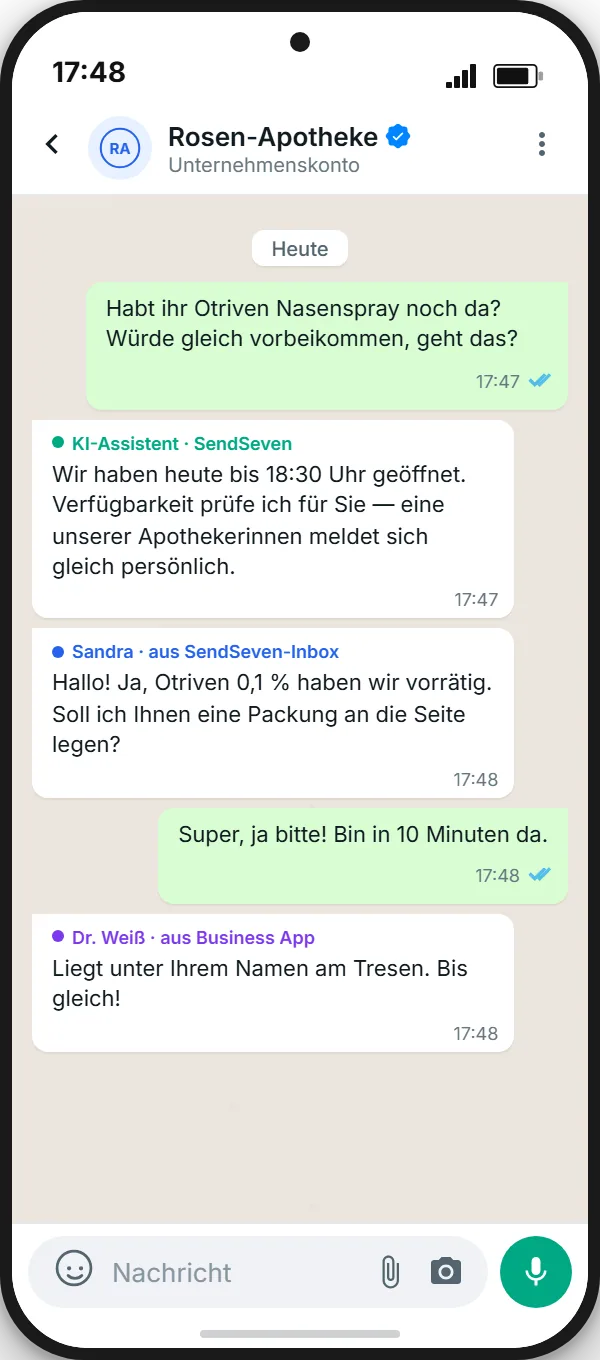
Example 2 — A neighborhood pharmacy with a delivery service
Customers message the pharmacy on WhatsApp to check availability, send prescription refill requests, and arrange delivery slots. The owner wants to keep the personal feel of replying directly from the app. With Coexistence, an AI knowledge base handles routine questions (opening hours, delivery area, service times). The team works prescription and order requests from the SendSeven inbox. The owner stays in the loop through the Business App.
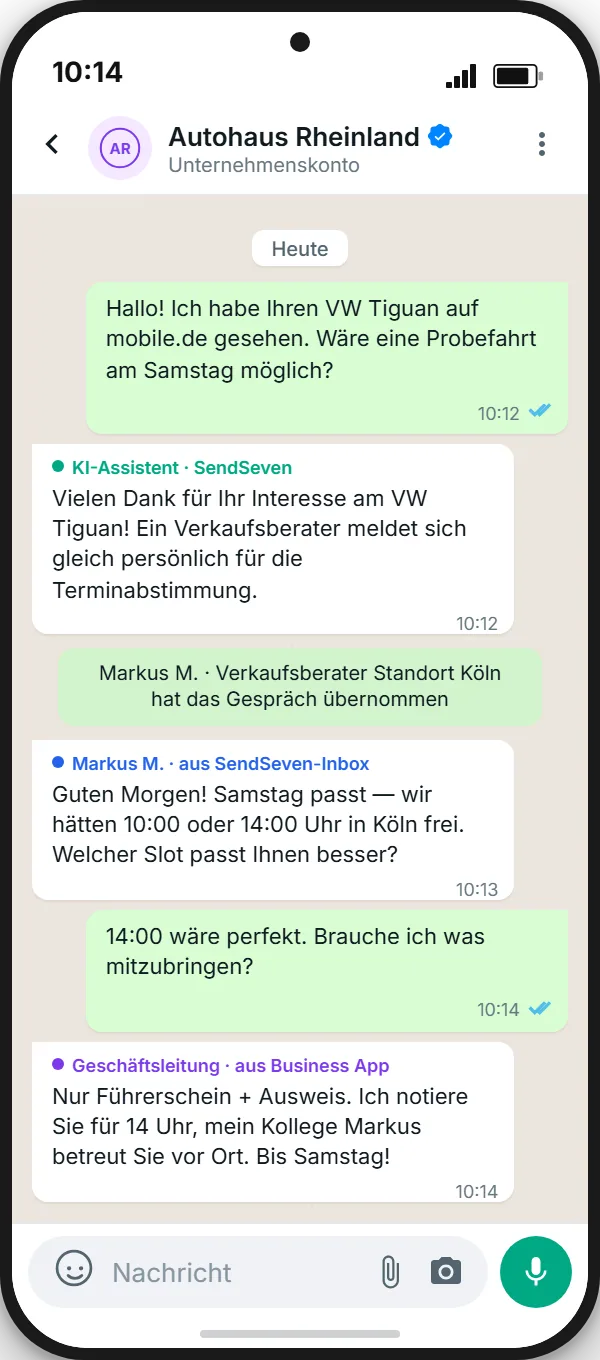
Example 3 — A car dealership with 2 locations
Test-drive requests, service bookings, and updates on used inventory all run through WhatsApp. Before Coexistence: every request landed on a single owner's phone, with response times often pushing 24 hours. After Coexistence: each location manager keeps their own Business App, the shared sales team works out of the SendSeven inbox, and marketing sends used-inventory updates to opted-in contacts. The result: response time under 15 minutes and a meaningful lift in test-drive bookings.
For more on how App + API + AI fit together for SMBs, see WhatsApp Business App vs. API: which one fits your business?
Frequently asked questions
Does Coexistence work with any phone number?
The number has to be one that's already verified in the WhatsApp Business App. Personal WhatsApp numbers need to be converted into a Business number first. Both mobile and landline numbers are supported.
Can I use Coexistence with multiple phones or owners?
The Business App stays tied to one smartphone. Through WhatsApp Web/Desktop you can add up to 4 additional linked devices to the app. The API side has no such device limit — all team members work through the platform.
What happens to existing chat history?
On initial activation, up to 6 months of chat history is pulled into the API platform if you opt in to history sync. Older messages stay visible inside the Business App. Group chats are not synced.
Can I turn Coexistence off again?
Yes, at any time. In the WhatsApp Business App: Settings → Account → Business Platform → Disconnect. From there the number can either continue app-only or be fully migrated to the API.
Does Coexistence affect Quality Rating or WABA tier limits?
WABA tier limits and Quality Rating apply the same way as on a standard API connection. Messages sent from the Business App technically don't count toward template marketing volume — the app doesn't send templates, so those messages are treated as regular 1:1 communication.
What about GDPR / data protection under Coexistence?
The data protection requirements are the same as for a normal WhatsApp Business API setup: valid opt-ins, a data processing agreement (DPA) with the API provider (SendSeven provides one), and clear privacy disclosures. For a fuller breakdown of what GDPR-compliant WhatsApp messaging looks like, see The complete WhatsApp Business API guide (2026).
Can the app and SendSeven both reply to the same chat at the same time?
Technically yes — both replies will be delivered. In practice it's better to agree on a clear split: the owner takes app replies in specific situations, the team handles the bulk of the conversation through the inbox. SendSeven helps with assignments and status tags to prevent double replies.
What does the setup cost?
The setup itself is free. Once the connection is live, the monthly SendSeven platform fee applies, starting at €49/month on the Basic plan (all 8 channels included). Messages sent from the Business App stay free. Coexistence is not a premium add-on: it is available on every plan, from Basic up. Full pricing and calculator: Pricing page.
Bottom line: Coexistence is the bridge between App and API
WhatsApp Coexistence is the most important change to the WhatsApp Business ecosystem since the launch of the Cloud API. For SMBs, it removes the biggest migration blocker: losing the familiar Business App. If you know about Coexistence, you have an extra option in the toolbox — a soft transition instead of a hard switch.
The limits are real, but for 99 % of SMB use cases they don't matter. The economics are clear: messages from the app are free, API messages run on Meta list prices, and the platform fee starts at €49/month. Reversible, no contract lock-in, ready in minutes.
Coexistence, live in 10 minutes.
Keep your WhatsApp Business App. Add a team inbox, AI, and campaigns through SendSeven. 14-day free trial, no credit card.
Start 14-day free trial →